SKYLIFTAI
MigDB Ecosystem — Data Validation Module

MigDB ComparePad
Post-Migration
Data Validation

Enterprise-grade day-by-day data integrity verification between source and target databases — ensuring zero data loss after every Oracle migration.

100%
Row Coverage
0
Data Loss Tolerance
Auto
Discrepancy Repair
24/7
Monitoring

What is MigDB ComparePad?

ComparePad is SkyFi's post-migration data validation engine — purpose-built to verify that every row, value, column, and data type has been accurately migrated from the source Oracle environment to the target. It performs hash-based, row-row comparisons at enterprise scale with automatic discrepancy repair.

🕐

When to Use

  • After the initial bulk data load is complete
  • Before go-live or production cutover
  • During final testing and validation phases
  • After incremental or phased migrations
  • Whenever data consistency must be verified between systems
  • Post-rollback to confirm data state integrity
  • During UAT to validate business-critical tables
  • After schema changes or DDL modifications on target

Advantages

  • Row-wise hash comparisons ensure complete data integrity
  • Automated data repair for mismatches — no manual SQL
  • Significantly reduces manual validation effort
  • Non-intrusive — zero impact on live source or target systems
  • Scalable for terabyte-scale enterprise databases
  • Supports cross-platform and heterogeneous comparisons
  • Parallel comparison threads for faster validation cycles
  • Detailed mismatch reports with column-level diff visibility
  • Works seamlessly during CDC (live replication) windows
🔗

Usage & Integration

  • Pre-integration via SkyFi MigDB as part of the migration ecosystem
  • Activated after migration completion to compare source and target data
  • Identifies and resolves discrepancies before final go-live
  • Requires separate licensing to enable ComparePad features
  • Assessment job history maintained for audit trails
  • Reports downloadable at any time from the MigDB Console
  • Supports scheduled or on-demand comparison runs
  • REST API available for CI/CD pipeline integration

How ComparePad Works

A five-stage automated pipeline that compares, identifies, and reconciles data discrepancies with zero impact on production workloads.

01

Configure

Define source Oracle and target connections, select schemas/tables, set parallelism level, and schedule the comparison job.

02

Extract & Hash

ComparePad reads rows from both environments, computes row-level hashes using SHA-256, and streams them into the compare engine.

03

Compare

Hash values are matched row-by-row across source and target. Mismatched, missing, and extra rows are flagged instantly.

04

Report

A detailed HTML/PDF report shows column-level diffs, mismatch counts, impacted tables, and suggested repair actions.

05

Repair

Automated repair re-syncs mismatched rows from source to target — no manual SQL scripts, no downtime required.

Built for Enterprise-Grade Validation

Every feature in ComparePad is designed around the goal, giving you absolute confidence that your data is intact post-migration.

🔢

Row-Value Hash Comparison

Every row in every table is hashed and compared — no sampling, no approximation. SHA-256 hashing ensures cryptographic-grade accuracy across all data types including LOBs, CLOBs, and BLOBs

🔧

Automated Delta Repair

When mismatches are detected, ComparePad auto-generates and executes repair DML — inserts for missing rows, updates for column diffs, deletes for phantom records — with full audit logging.

⚙️

Parallel Comparison Engine

Configurable parallel threads partition tables by primary key ranges and compare them simultaneously — enabling terabyte-scale databases to be validated in hours, not days.

🌐

Non-Intrusive Architecture

ComparePad performs read-only operations on both source and target. It places zero load on production OLTP workloads, making it safe to run during live CDC replication windows.

🔄

Cross-Platform Support

Compare Oracle on-premise against Amazon RDS Oracle, Oracle@AWS, Oracle@Azure, Oracle@GCP, and OCI Autonomous Database. Supports heterogeneous and homogeneous topologies.

📊

Column-Level OOS Reports

Detailed reports pinpoint exactly which column values differ for each mismatched row — eliminating guesswork and accelerating root cause analysis.

📋

Assessment Job History

All comparison jobs are stored with full metadata — table counts, mismatch rates, repair status, and timestamps. Download reports at any time for audits and compliance reviews.

Scheduled On-Demand Runs

Schedule recurring validation jobs during off-peak hours or trigger them on-demand via the MigDB Console or REST API for CI/CD pipeline integration.

🔒

Enterprise Security

AES 128/192/256-bit encryption for all data in transit. Secured wallet-based database connectivity. SSL/TLS for every cross-region comparison session

🔡

LOB & Complex Type Support

Full validation of LOB, CLOB, BLOB, NCLOB, XMLTYPE, and JSON columns — data types that are notoriously difficult for traditional tools to compare accurately.

📈

Intuitive GUI Console

Mid-level engineers can configure, run, and monitor complex validation jobs without deep DBA expertise. Real-time progress dashboards show table-by-table comparison status.

🔗

CloudWatch Integration

Full observability through Amazon CloudWatch. Monitor comparison health, lag, throughput, and repair execution — all within your existing AWS observability stack.
See ComparePad in Action

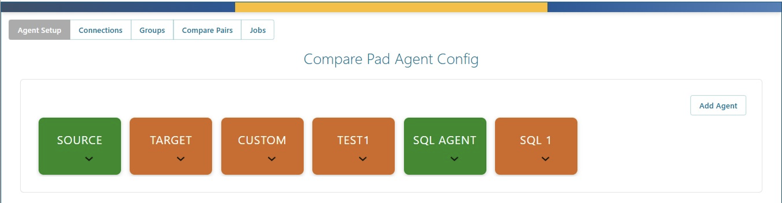
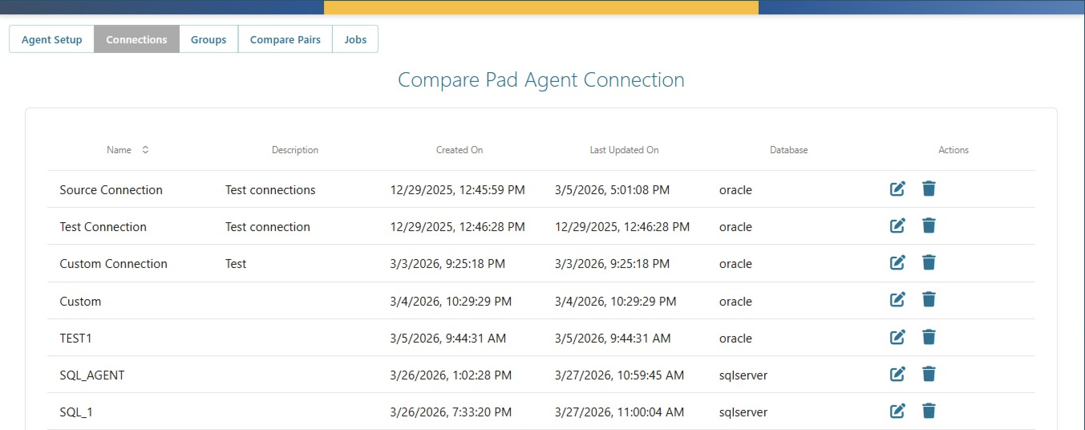
A clean, intuitive agent console with full visibility into every agent, connection, compare pair, and job run.

Agent Setup — Configure source, target, and custom agents
Agent Setup — Configure Agents
Connections — Manage Oracle and SQL Server database connections
Connections — Oracle & SQL Server
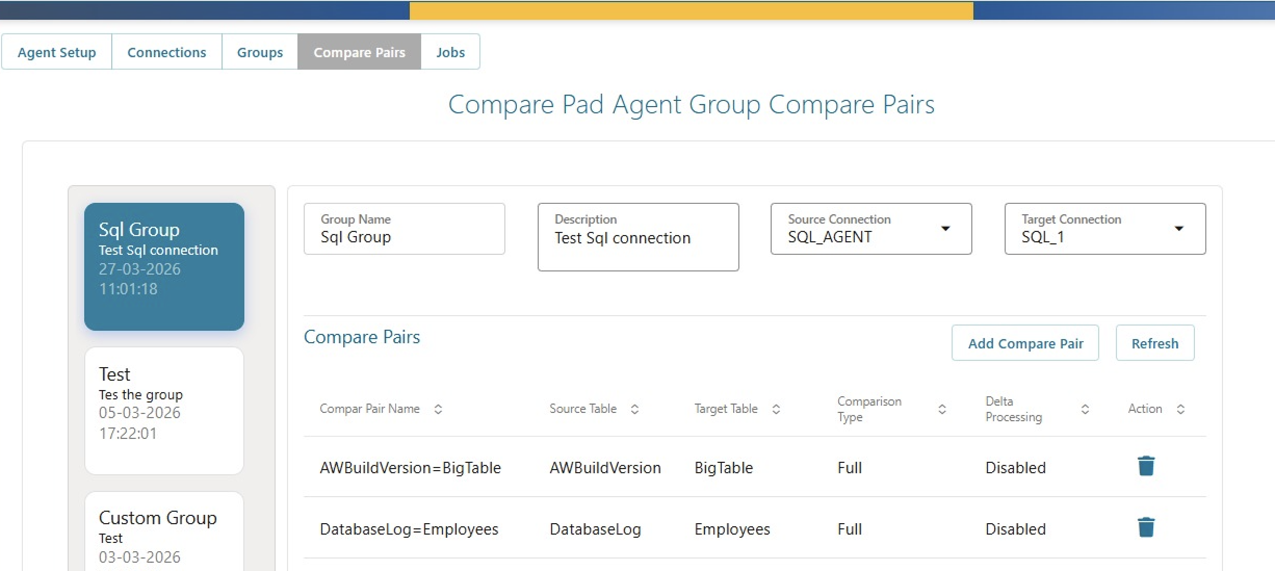
Compare Pairs — Map source and target tables
Compare Pairs — Table Mapping
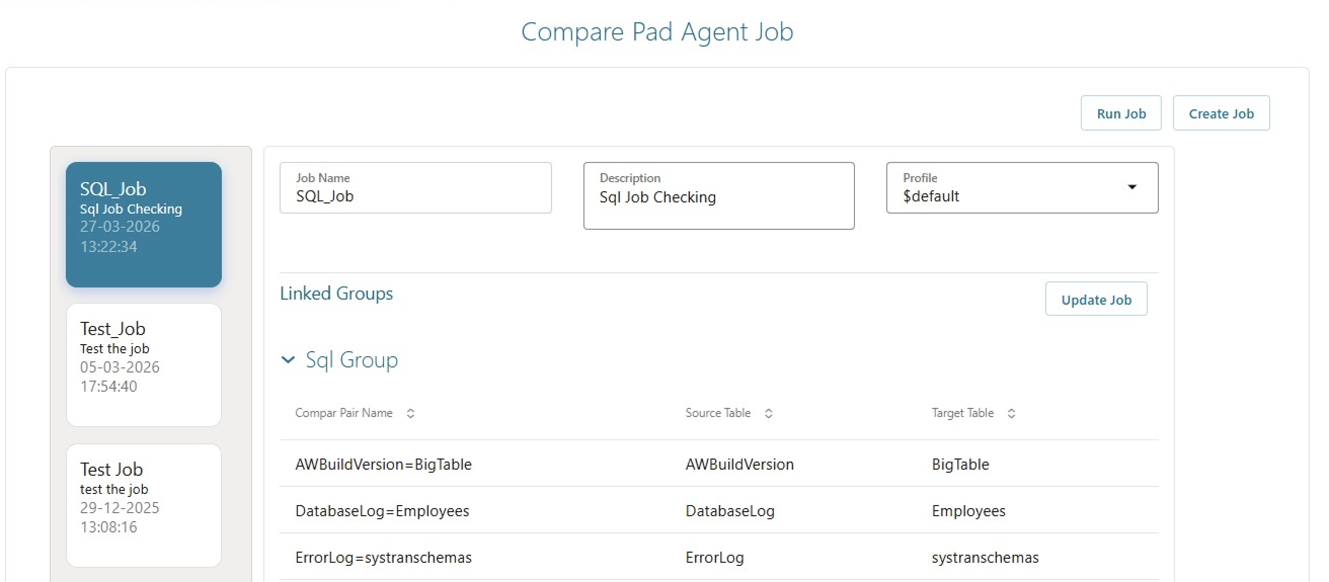
Jobs — Create & Manage
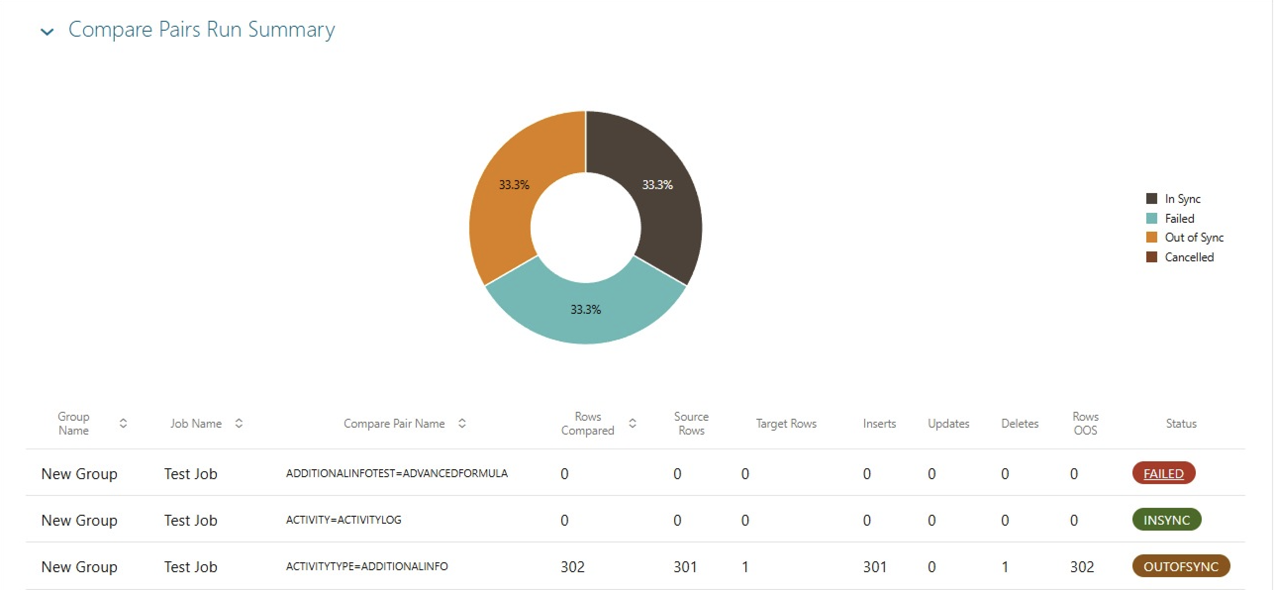
Run Summary — Donut chart with In Sync / Out of Sync / Failed breakdowns
Compare Pairs Run Summary — Visual Status Breakdown
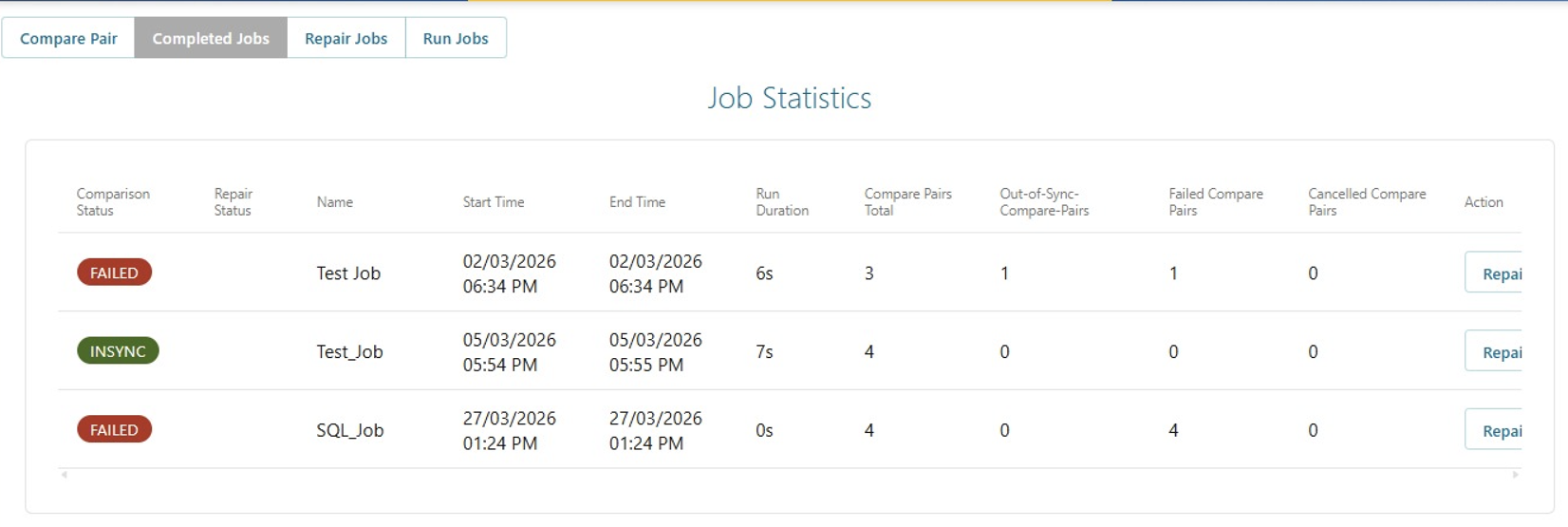
Job Statistics — Completed jobs with row counts and repair actions
Job Statistics — Completed Jobs
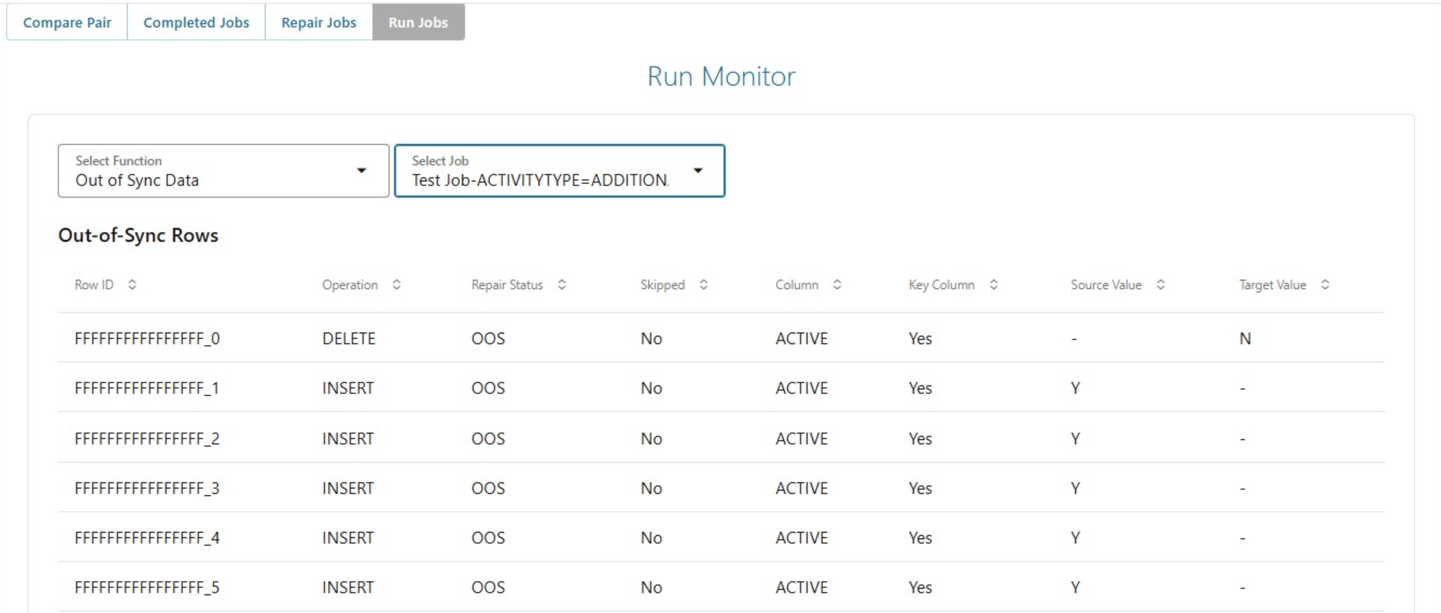
Run Monitor — Out of Sync row details with operation and values
Run Monitor — OOS Row Detail

Ideal Stages for ComparePad

ComparePad fits seamlessly into every phase of the migration lifecycle — from initial load validation through warranty period and beyond.

01

🔄 Post-Initial Load

After the bulk data extract and load completes, run ComparePad to verify that all tables, rows, and columns have been transferred accurately before beginning CDC replication.

02

🧪 During UAT & Final Testing

Validate business-critical tables selected by the QA and business teams. Generate downloadable evidence reports for sign-off and compliance documentation.

03

✅ Pre-Cutover Go-Live Check

Run a final full-schema comparison immediately before the production cutover window. ComparePad ensures the target is 100% aligned and ready for traffic switchover.

04

🔁 After Incremental or Phased Migrations

For large databases migrated in phases, validate each phase independently. Confirm each batch is clean before proceeding to the next — reducing cumulative risk.

05

📡 Warranty Period Monitoring

Continue running scheduled comparisons during the post-go-live warranty period while bidirectional CDC is still active — confirming ongoing data parity between legacy and cloud.

06

📋 Audit & Compliance Verification

Generate signed comparison reports for regulatory audits, internal compliance reviews, and migration sign-off documentation — stored indefinitely in assessment job history.

ComparePad vs Manual Validation vs AWS DMS

See why enterprises choose ComparePad over error-prone manual scripts and limited native tooling.

Capability ⚡ ComparePad Manual SQL Scripts AWS DMS Validation
Row-Level Validation SHA-256 per row Error-prone COUNT/CHECKSUM Sampling only
LOB / CLOB / BLOB Support Full support Extremely difficult Limited / unreliable
Automated Repair Auto-generated DML Manual scripting required Not availabley
Column-Level Diff Reporting Per-column visibility Custom script required Row-level only
Parallel Comparison Configurable threads Sequential only ! Limited
Impact on Source System Zero impact ! Query load risk Read-only
Scheduling / Automation Built-in scheduler + API Cron / manual only ! Limited
Audit-Ready Reports Downloadable HTML/PDF None CloudWatch logs only
Cross-Platform Support AWS, Azure, GCP, OCI ! Custom per environment AWS only
Setup Complexity One-click GUI High — requires DBA expertise ! Medium

ComparePad Licensing

MigDB ComparePad is integrated within the SkyliftAI MigDB platform but requires separate licensing to unlock and use. It is available as an add-on to any MigDB for Oracle subscription — contact the SkyliftAI team to enable it for your migration project.